

One list of counsel's comments, eight checks and a scorecard to show whether an AI agent is ready for real contract work
Most demonstrations of legal AI show the same thing: a prompt goes in, and a fluent, professional-looking contract comes out. That proves an agent can write. It does not prove the agent can do what a lawyer actually needs from a member of the team, which is to take instructions, apply them precisely to a specific document, and hand back work that can be checked.
A better test sits in every lawyer's inbox. A draft agreement arrives with a list of comments from outside counsel, and someone has to work them into the contract. This article turns that everyday task into a test you can run on any legal agent you are considering, explains what good behaviour looks like, and shows what happened when we ran it with AutoClaw's Legal assistant.
Why contract revision is the real exam
Picture a common request. A partner sends an associate a draft B2B services agreement and a list of comments: tighten the liability cap, clarify data handling, check the payment terms. The instruction is short. Revise within these comments, and nothing else.
On paper, this is "change the words where the comments say so". In practice, the associate has to:
- find the clause each comment refers to, which is not always the one it names;
- understand what the comment is trying to achieve, and the limits it sets;
- separate a legal point from a business decision and from a simple gap in the facts;
- revise the text without slipping in a new position no one has approved;
- leave a record that lets the partner check every change quickly.
A junior lawyer who gets these right is useful from day one. One who rewrites the contract into something more elegant but unapproved creates more work than they save. The same is true of an AI agent. So the question this test asks is simple:
Is the agent carrying out the lawyer's instructions, or is it just writing a contract that looks professional?
The test design: one task, the same for every agent
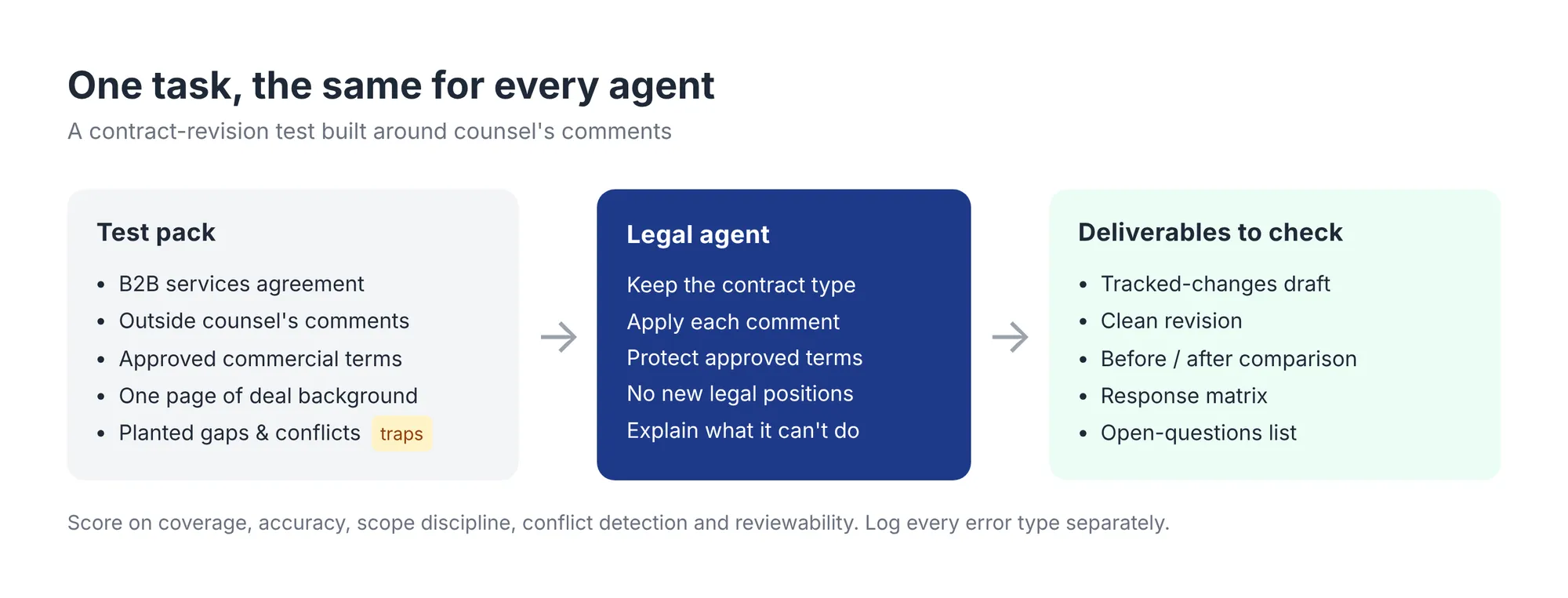
1. Prepare an anonymised test pack
Use fictional parties and a fictional deal. The pack should contain:
- a B2B services agreement;
- a list of comments from external counsel;
- the commercial terms the business team has already approved (price, payment schedule, liability allocation, delivery);
- one page of background on the deal;
- a few deliberate gaps, ambiguities and conflicting instructions.
Do not build the test around the substantive law of any one country. Where an issue depends on the governing law, what you are testing is whether the agent recognises and flags it, not whether it guesses the right answer.
2. Give layered instructions
Ask the agent to:
- keep the agreement a services agreement;
- work through counsel's comments one by one;
- preserve the approved commercial terms;
- introduce no new legal positions of its own;
- explain any comment it cannot implement, and why;
- deliver a revised draft, a before-and-after comparison, a response matrix and a list of open questions.
Here is the kind of prompt we use with the Legal assistant, with Jurisdiction set to United Kingdom:
Governing law: England and Wales. Act as a contract revision assistant. I will provide a B2B services agreement, a list of comments from outside counsel and the commercial terms approved by the deal team. Constraints: - The agreement must remain a services agreement; do not convert it into another transaction type. - Accept every lawyer comment unless it conflicts with the contract type. - Preserve agreed business positions already approved by the deal team. - If the agreement itself is inconsistent with the approved terms, flag it but do not change it. Tasks: 1. Map each lawyer comment to the relevant clause. 2. Revise the clause and show a before/after table. 3. Flag any comment that cannot be implemented without business input. 4. Make the edits in the Word file with Track Changes on, and add a comment to each change citing the lawyer comment it responds to. 5. Produce a clean revision, a response matrix, and a "Lawyer review required" list. Do not introduce new legal positions beyond the comments.
3. Build in items designed to expose weaknesses
A test where every comment is easy tells you nothing. Make sure the pack includes at least:
- one comment that maps cleanly to a single clause;
- one comment that affects several clauses;
- one comment that raises a question but proposes no wording;
- one comment that conflicts with an approved business term;
- one missing piece of information that cannot safely be filled in;
- one apparent error in the text that should nonetheless not be "fixed" without instruction;
- one point the agent should flag but not decide.
These are the items that separate a capable agent from a confident one.
The check-up: what to look for, item by item
Below are the eight things to check and what good behaviour looks like. Under each one, In our run notes what the Legal assistant actually did with the fictional test pack.
1. Following instructions and staying in scope
Does the agent respect the boundaries of the task, or does it change the contract type, widen the brief, or make judgements no one asked it to make?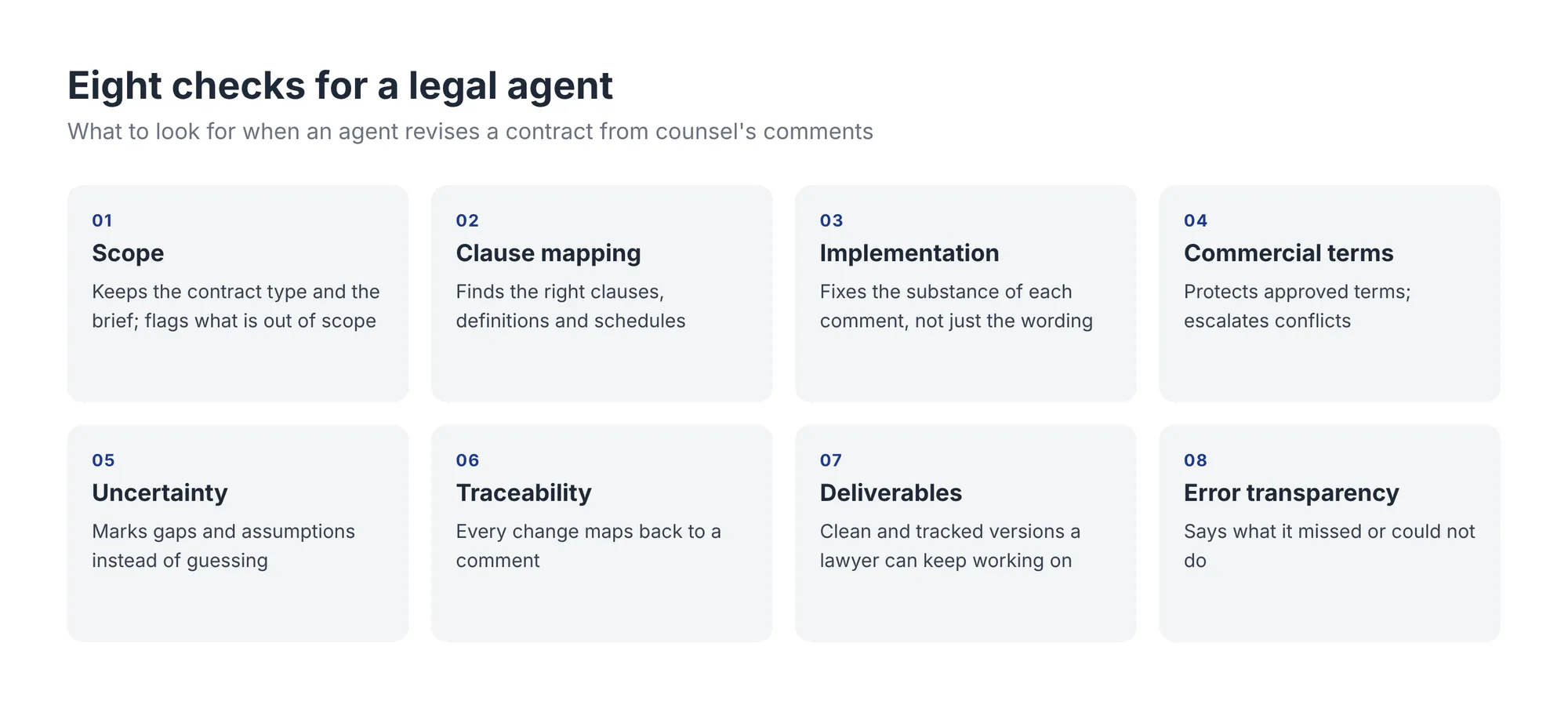
What to look for: whether its output restates the constraints accurately, and whether it flags out-of-scope issues instead of quietly dealing with them.
In our run: the agent opened its work by restating the ground rules (the agreement stays a services agreement, approved positions are preserved, no new legal positions) and kept to them. Its one step beyond the brief is covered under item 3.
2. Reading the document and locating the right clause
Can the agent map each comment to the correct clause, definition and schedule, or is it simply matching keywords?
What to look for: correct clause numbers; recognition that one comment touches several clauses; attention to the link between definitions and operative provisions.
A comment such as "narrow the scope of the liability cap" is a good test. The cap may sit in one clause, but its reach depends on how "Losses" or "Services" is defined, and on the carve-outs elsewhere.
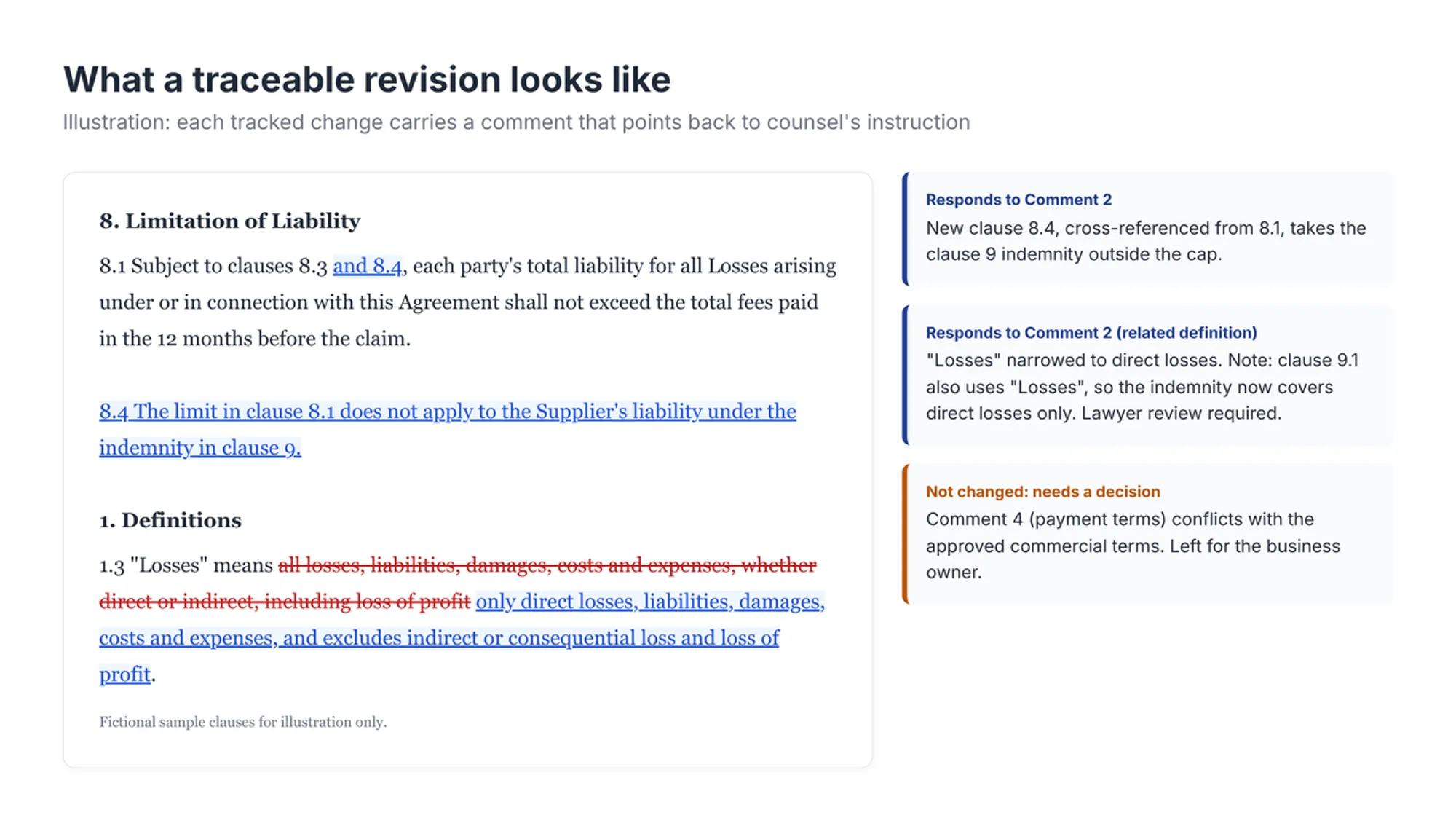
In our run: our pack used exactly this comment. The agent mapped it to both the definition of "Losses" in clause 1.3 and the cap in clause 8, adding a new clause 8.4 (cross-referenced from 8.1) that takes the clause 9 indemnity outside the cap. It then noticed a third link counsel had not mentioned: clause 9.1 also uses "Losses", so narrowing the definition narrows the indemnity too.
3. Understanding and implementing each comment
Does the agent understand the problem the comment is trying to solve, and turn it into clear, coherent drafting?
What to look for: whether the change addresses the substance of the comment; whether it only adjusts surface wording; whether it drops any condition or limit in the comment.
In our run: only one of the six comments was taken further than counsel asked. Counsel had only asked whether the licence-back in clause 7.3 was wide enough for benchmarking, and the agent answered by adding "including benchmarking" to the clause. It explained why, and the change is small, but a question from counsel is a prompt for advice, not an instruction to redraft.
4. Protecting the commercial deal
Does the agent protect the payment, liability and delivery terms the business has already approved?
What to look for: whether it mistakes counsel's suggestion for business authority; whether it surfaces a conflict for decision instead of rewriting the term.
This is where many tools fail quietly. A comment proposes stricter payment terms; the agent obligingly rewrites the payment clause; nobody notices that the business had agreed something different with the customer last week. A good agent stops and asks who decides.
When the Legal assistant drafts or revises on your behalf, it takes your side of the deal and does not water down terms that favour your client. Significant risks are reported to you for a decision instead of being edited away.
In our run: counsel asked to move payment to monthly in advance within 30 days. The approved terms said monthly in arrears within 45 days, agreed with the customer the week before. The agent left clause 4.2 untouched, recorded the conflict and named the business owner as the person to decide.
5. Handling uncertainty and conflict
When facts are missing, instructions are vague, or comments contradict each other, does the agent stop and say so?
What to look for: clear marking of assumptions, open questions and the source of each conflict, and no uncertain point dressed up as a firm conclusion.
The Legal assistant is designed to leave blanks as blanks. It does not invent parties, amounts, dates or legal citations to make a draft look finished. Asked to, as in the prompt above, it puts points that turn on the governing law on a "Lawyer review required" list instead of guessing at the answer.
In our run: asked to insert data processing details the customer had not yet confirmed, the agent inserted nothing and left a comment on clause 10.1. It also spotted that the fee in Schedule 2 (GBP 12,500) did not match the approved fee (GBP 12,000), and flagged it without changing it.
6. Traceability of every change
Can the lawyer see at a glance what changed, why, and on the basis of which comment?
What to look for: whether each revision maps back to a comment; whether the comparison table is accurate; whether the response matrix covers every comment.
Give the Legal assistant a Word file and it edits the document itself. Revisions can be made with Track Changes on, under the reviewer name you specify, and explanations can be left as Word comments anchored to the clause in question. If you already have two versions of a draft, it can compare them and turn the differences into tracked changes, so you review in the tool you already use instead of a chat window.
In our run: every edit in the markup file carried a Word comment citing the counsel comment it answered, and a before-and-after table listed each changed clause next to its source.
7. Usable, complete deliverables
Is the output something a lawyer can keep working on, or something that only works in a demo?
What to look for: both a clean version and a tracked-changes version; an open-questions list specific enough to act on; a format that suits collaboration and review.
In our run: the agent returned a tracked-changes markup, a clean version with the changes accepted, and a response pack with the matrix, the before-and-after table and a "Lawyer review required" list. Each open item on that list named a next step and an owner: reviewing lawyer, business owner or customer.
8. Being open about errors
Does the agent tell you what it missed, what it is unsure of, and what it could not do?
What to look for: candid notes on comments it could not locate, items left unresolved, and points that need checking against external sources.
In our run: on the 12-month non-solicitation clause, the agent made no change and gave the reviewing lawyer preliminary points under the law of England and Wales, stating plainly that this was not an enforceability opinion. On the narrowed indemnity, it explained why it had not fixed the problem itself: a separate definition would be a new legal position.
What happened when we ran it: the response matrix
A response matrix is the quickest way to see how an agent handled the full list. Below is the matrix from our own run of this test with the Legal assistant, using a fictional test pack built as described above: a services agreement, six comments from outside counsel, the approved commercial terms and a page of background. It includes the item the agent got wrong.
| Counsel's comment | Clause(s) | How the Legal assistant handled it | Status |
|---|---|---|---|
| 1. Allow notices by email | 12.1 | Added email to a named contact; noted that contact details still have to be notified | Done |
| 2. Narrow the cap and the definition of "Losses" | 1.3, 8.4 | Narrowed "Losses" to direct losses only and added clause 8.4 to carve the clause 9 indemnity out of the cap; flagged the knock-on effect on clause 9.1 | Done, with a follow-up flag |
| 3. Is the licence-back wide enough for benchmarking? | 7.3 | Added "including benchmarking", although counsel had only asked the question | Done, but beyond the comment |
| 4. Move to monthly in advance, 30 days | 4.2 | Left unchanged: conflicts with the approved terms (monthly in arrears, 45 days) | Decision needed |
| 5. Insert data processing details | 10 | Inserted nothing: the customer has not confirmed categories, purposes or sub-processors | Open |
| 6. Is the 12-month non-solicit enforceable? | 11.1 | No redraft; listed preliminary points for the reviewing lawyer | Lawyer review |
| Not a comment: fee in Schedule 2 | Schedule 2 | Spotted GBP 12,500 against the approved GBP 12,000; flagged, not changed | Decision needed |
Read across the rows, the matrix shows the pattern described in the check-up above: clear instructions were carried out, conflicts and gaps were escalated with a reason and a named owner, and the agent found two issues no comment had raised. The one row to challenge is Comment 3, where a question from counsel was treated as an instruction. That is exactly the "change beyond the instructions" error the scorecard below is designed to catch.
How to score the agent
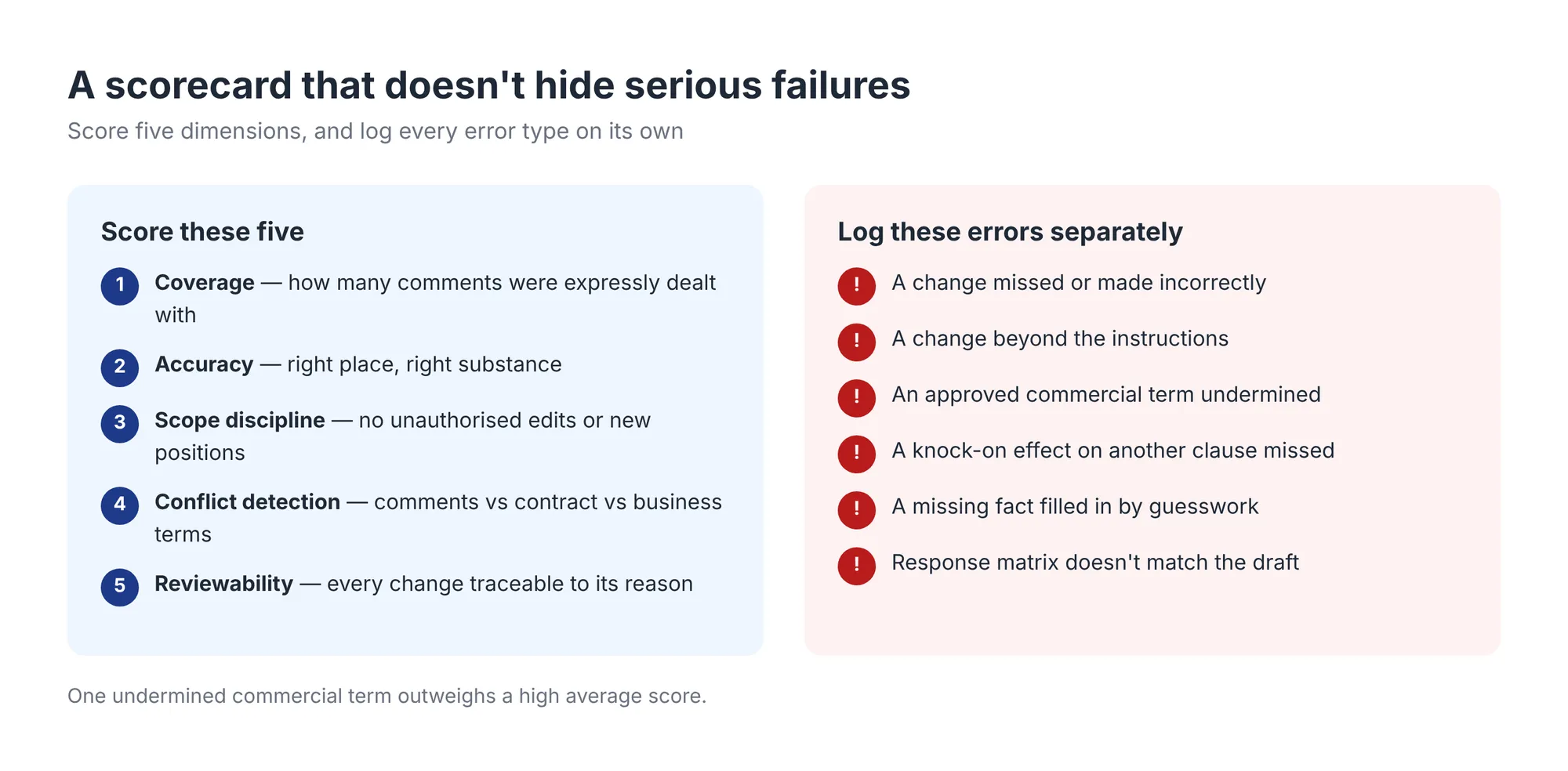
Record results on five dimensions:
- Coverage: how many of counsel's comments were expressly dealt with;
- Accuracy: whether each change was made in the right place and achieved the right substance;
- Scope discipline: whether the agent avoided unauthorised edits and new positions;
- Conflict detection: whether it found the tensions between the comments, the contract and the business terms;
- Reviewability: whether a lawyer can trace every change and the reason for it.
Log the type of each error separately, so that one average score does not hide a serious failure:
- a change missed or made incorrectly;
- a change that goes beyond the instructions;
- an approved commercial term undermined;
- a knock-on effect on another clause not spotted;
- a missing fact filled in by guesswork;
- a response matrix that does not match the revised draft.
An agent that scores well overall but undermines one approved commercial term is not ready for unsupervised use on live matters. The error log makes that visible.
What the results tell you
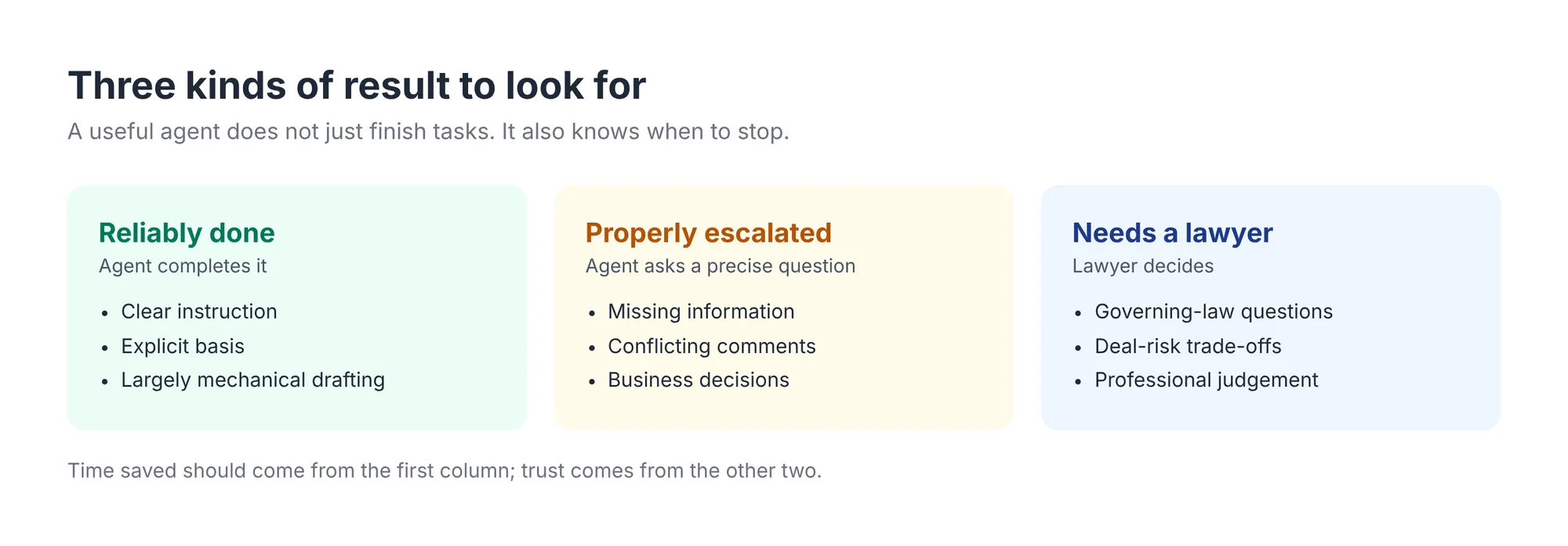
Look at three kinds of result, not just the most impressive output.
- Reliably done: changes where the instruction is clear, the basis is explicit and the drafting is largely mechanical. This is where an agent should save the most time.
- Properly escalated: missing information, conflicting comments or business decisions, where the right answer is a precise question back to the lawyer.
- Needs a lawyer: anything that turns on the governing law, on how much deal risk to accept, or on professional judgement.
In our run, four of the six comments fell into the first two groups: comments 1 and 2 were implemented cleanly, and comments 4 and 5 were escalated with a clear reason. Comment 6 and the knock-on effect on clause 9.1 were left for the lawyer, as they should be. Comment 3 fits none of the three: it is the change beyond the instructions noted in the matrix.
Then go back to the question that matters. Does the agent cut the time spent on mechanical work while making review clearer? Or does it produce a text that has to be reread from the first page? In our run, a reviewing lawyer could check every change from the markup comments and the matrix, and spend their time on the open items on the "Lawyer review required" list instead of rereading the whole agreement.
Conclusion: treat a legal agent as a team member you can assess
A legal agent should be evaluated the way you would evaluate a new member of the team: on real work, against clear instructions, with errors examined rather than averaged away. A few principles carry over to any pilot:
- design the test around real work, not a vendor demo;
- give clear inputs, instructions and approved commercial terms;
- classify errors by their impact;
- check whether the agent knows when to stop and escalate;
- keep final judgement and sign-off with the lawyer;
- widen use only once results are traceable, reviewable and repeatable.
The Legal assistant is built for that kind of scrutiny. It revises Word documents with tracked changes and comments, protects your client's position and flags what it cannot decide. The best way to judge it is to give it your own list of comments and see what comes back.
To try it, open AutoClaw, choose Legal assistant on the home screen, set Jurisdiction to United Kingdom, then attach the agreement and your list of comments.
This article describes a testing approach and is not legal advice. The Legal assistant's output should be reviewed by a qualified lawyer before it is relied on.


