
You have a client, a defined service and a project ready to begin. What you do not have is a contract.
For a consultancy, the commercial deal might fit into a short email. A workable agreement needs more: a clear scope, deliverables, payment terms, acceptance arrangements, intellectual property provisions and a way to handle changes. A generic template rarely settles those choices for a particular project.
This walkthrough follows a real B2B consulting request, recreated in AutoClaw's Legal workspace. The same workflow — clarify the business brief, draft the documents, review the result — can be adapted to other contract types.
The Scenario: A Real Request, Recreated for This Walkthrough
The starting point was a genuine drafting request. A consulting firm needed a B2B agreement drafted from scratch, covering market research, data collection, business analysis and advisory services. It wanted a professionally structured English-language agreement that protected its commercial interests, together with practical supporting documents.
To protect the original user's privacy, we recreated the task with fictional companies and illustrative terms. The provider is Example Alpha Research Ltd and the client is Example Beta Commerce Ltd. The project covers UK market research and market-entry advice over about six weeks, for a fixed fee of £12,000 (exclusive of VAT where applicable), paid in two £6,000 instalments linked to signing and final delivery. The governing law is England and Wales.
What AutoClaw Produced: An Editable Contract Package
The run produced six core Word documents, all editable:
- Consulting Services Agreement — the main terms, responsibilities and proposed risk allocation.
- Statement of Work (SOW) — scope, deliverables and responsibilities.
- Payment Schedule — instalments, invoicing and payment arrangements.
- Deliverable Acceptance Form — a practical record for accepting or rejecting deliverables.
- Negotiation Guide — proposed positions and fallback options for internal discussion.
- Lawyer Review Required checklist — legal questions, missing information and decisions that need approval.
The Negotiation Guide and the checklist are internal working documents, not additional contracts for the client to sign. Later refinement added a change log, a consistency checklist and a list of unresolved decisions.
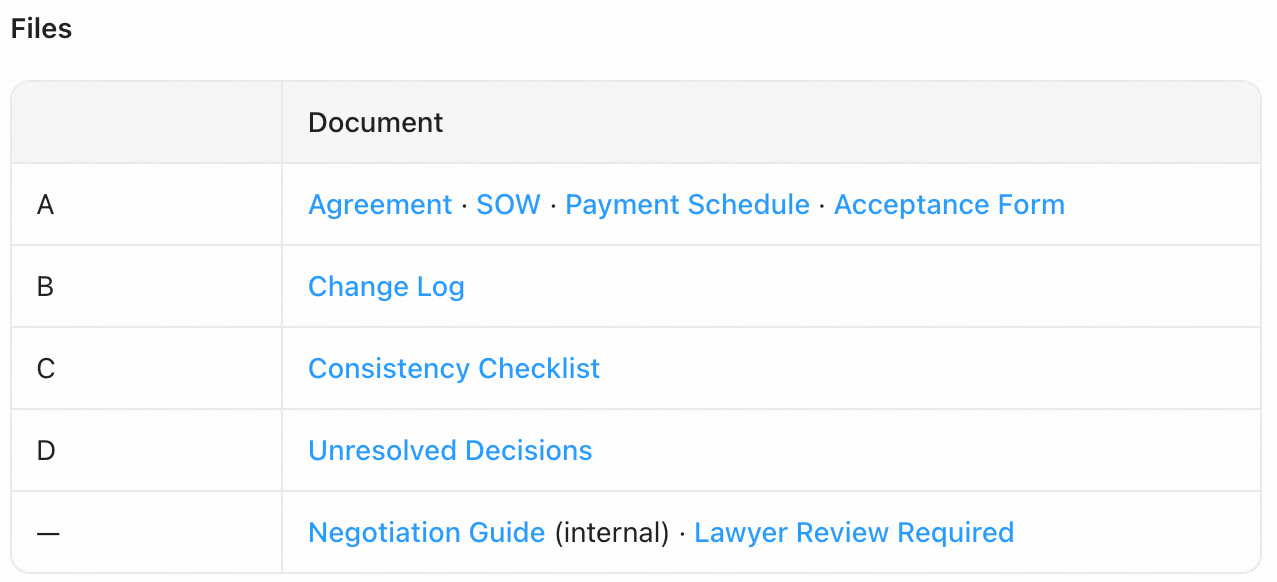 Figure 1. AutoClaw's file list: the agreement, schedules and supporting review materials.
The documents are designed to work together. The agreement sets the legal terms, the SOW and Payment Schedule turn them into project arrangements, and the review materials tell the business and legal teams what still needs a decision.
Step by Step: Drafting a B2B Consulting Agreement
Step 1. Describe the business arrangement
Open AutoClaw's Legal workspace and give the transaction details: who provides the services, what the client receives, the timetable, the price, the payment milestones and the jurisdiction. Say which party you represent and which documents you need.
Here we selected United Kingdom in the country field and specified England and Wales as the governing law in the prompt. The country setting and the governing law are not always the same thing, so it is worth stating both.

Figure 2. The United Kingdom country setting in AutoClaw's Legal workspace.
We also asked AutoClaw not to start drafting until we had sent a clarification instruction. It summarised the brief — the parties, the £12,000 fee, the six-week programme and the expected deliverables — and waited for the next message.
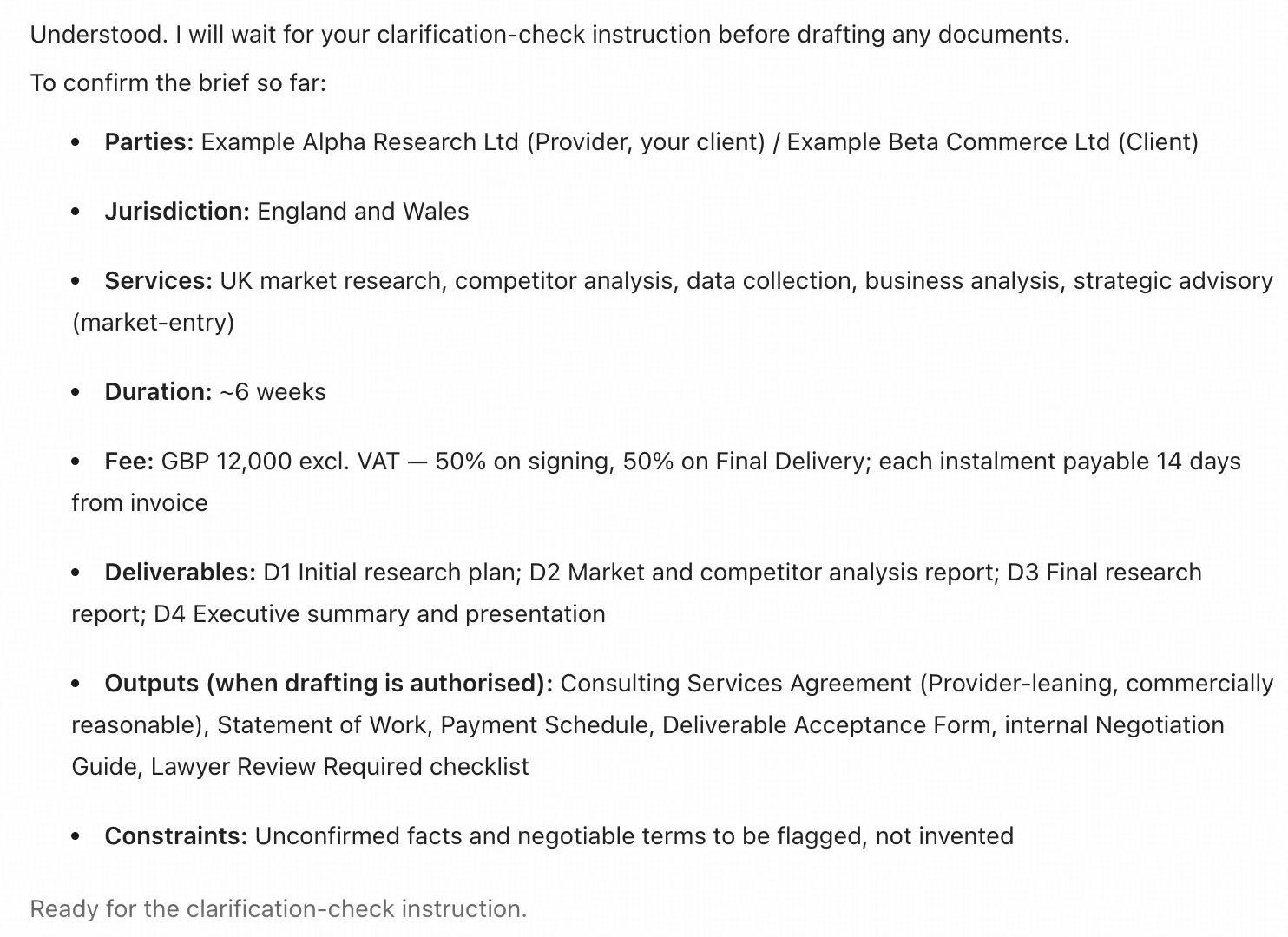
Figure 3. AutoClaw confirms the project brief before drafting.
Step 2. Clarify the terms that matter
Next, in the same conversation, ask AutoClaw to check for missing or conflicting information before it writes anything. This matters most when a short brief leaves important commercial choices open.
AutoClaw responded with interactive clarification questions. One asked whether the second £6,000 instalment should fall due on delivery of the final materials or only on their formal acceptance. It set out the alternatives, explained the trade-offs and marked a recommended option, leaving the choice to us. If a question is left unanswered, AutoClaw continues after a short countdown, so answer the questions that matter to you while they are on screen.
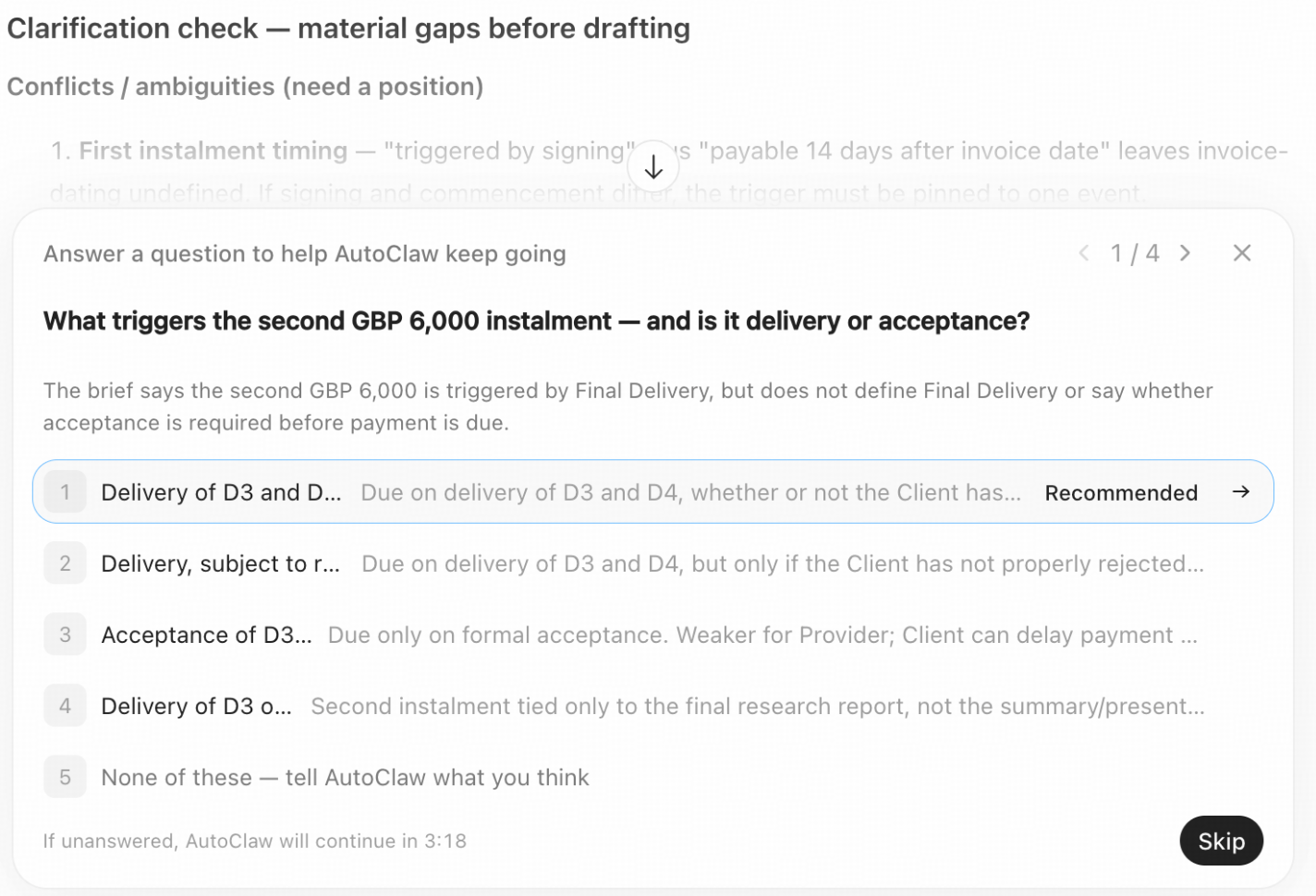
Figure 4. A clarification question about the second payment milestone.
Answer the material questions and confirm your commercial position. If a point is genuinely undecided, it can stay in the draft as a clearly marked placeholder for negotiation rather than appear as an agreed term.
Step 3. Generate the agreement and project documents
Once the key commercial questions are settled, AutoClaw moves on to drafting. The agreement opens with a Key Terms summary covering the parties, services, duration, fees, deliverables and proposed legal framework.
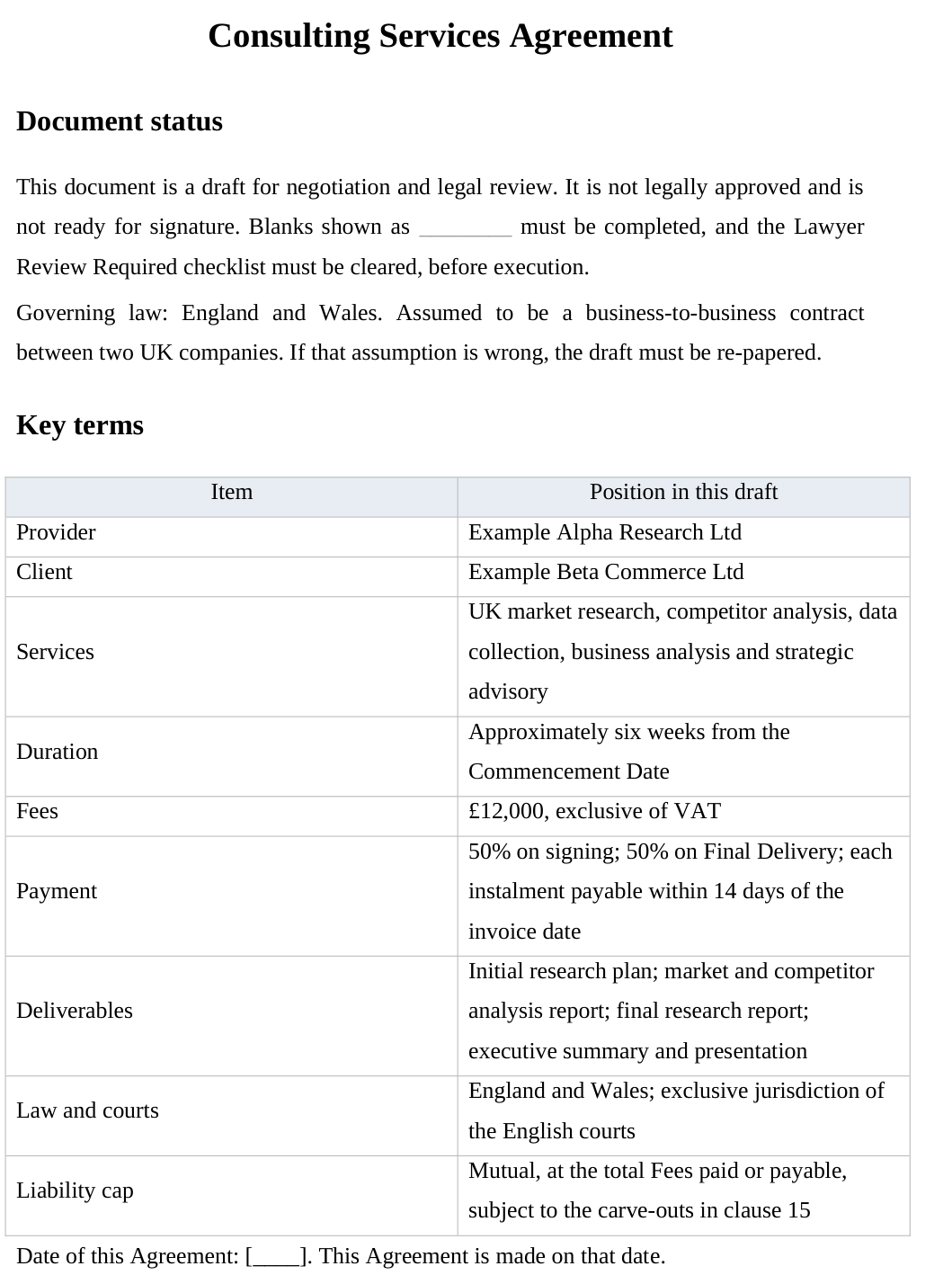
Figure 5. The Consulting Services Agreement opens with a summary of key terms.
The SOW turns the broad service description into four named deliverables: D1, an initial research plan; D2, a market and competitor analysis report; D3, a final research report; and D4, an executive summary and presentation.
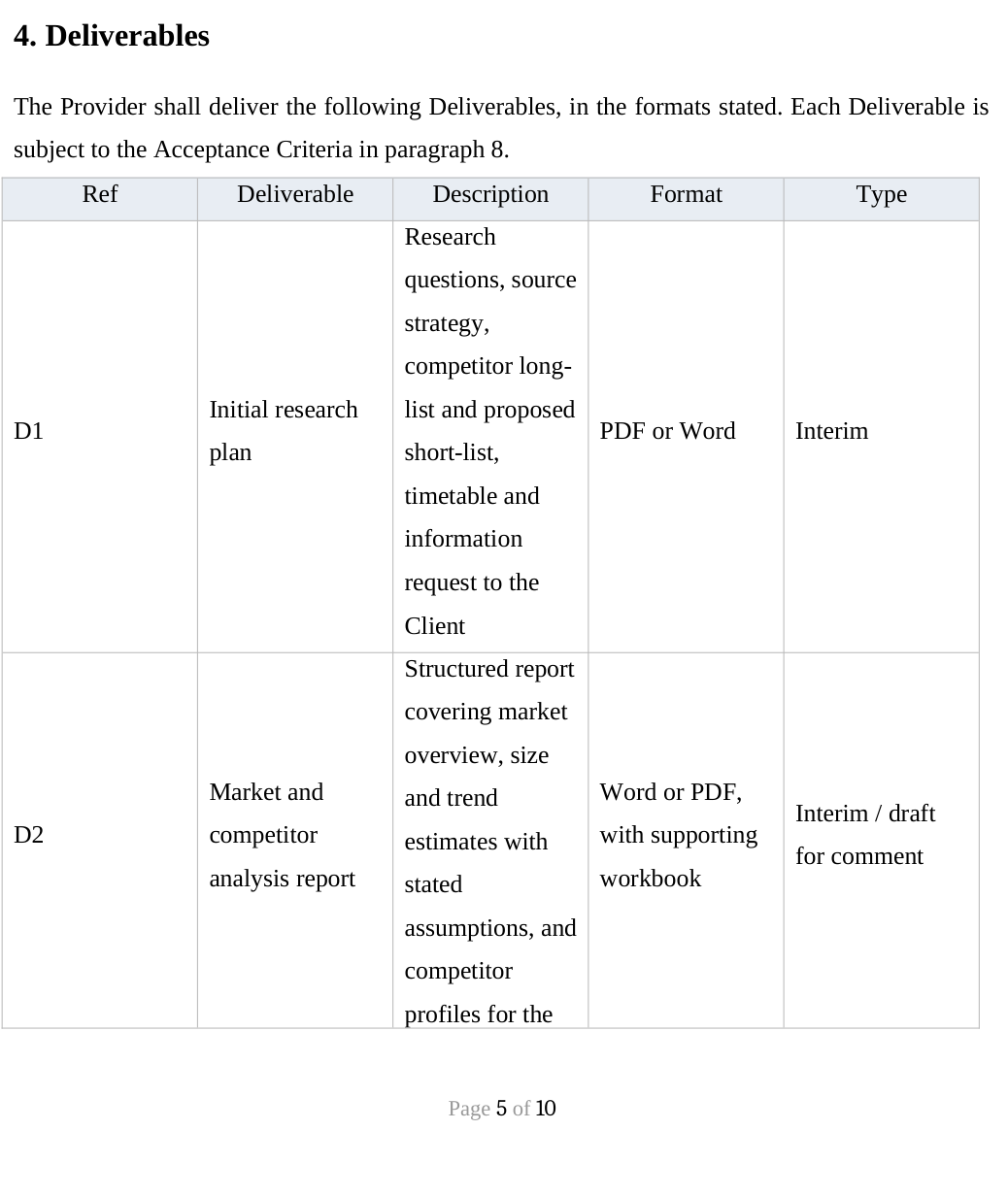
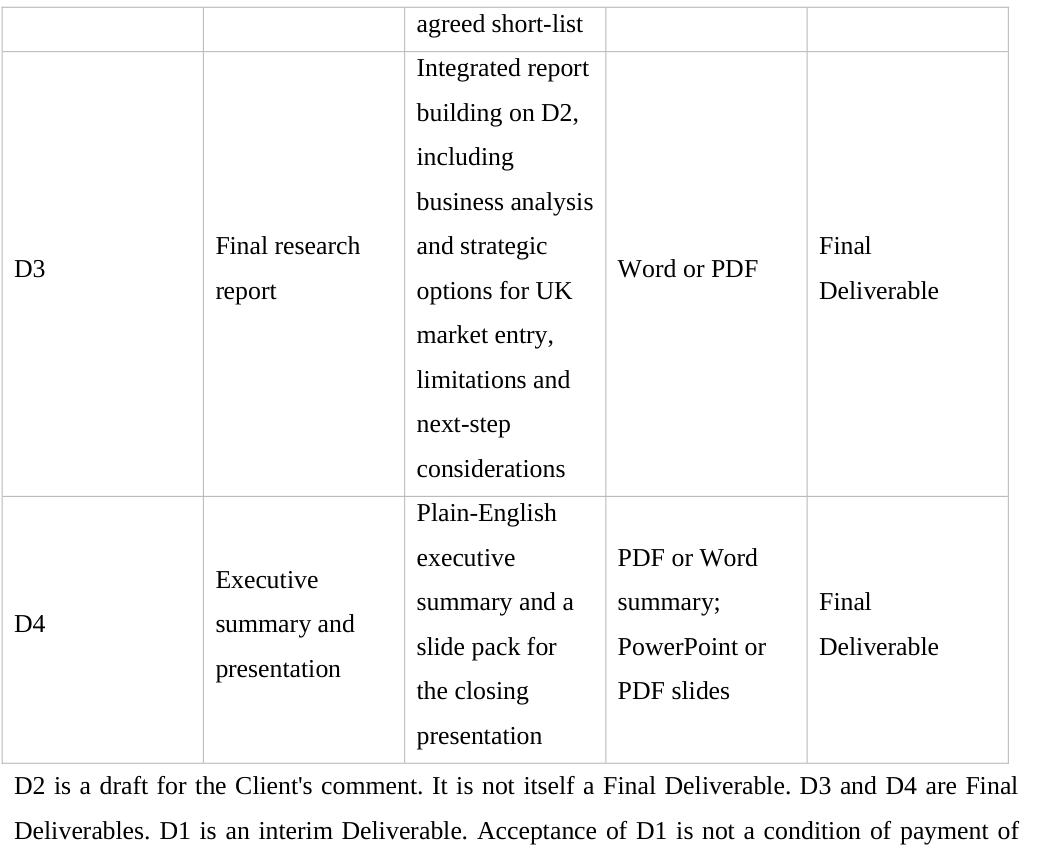
Figure 6. The SOW sets out the final report and presentation deliverables.
Step 4. Check the terms and refine the draft
Review the documents against your original brief. Where a term needs adjusting, ask AutoClaw for a focused revision, then check that the related schedules still match. In this example, that process tightened the payment and acceptance provisions shown below.
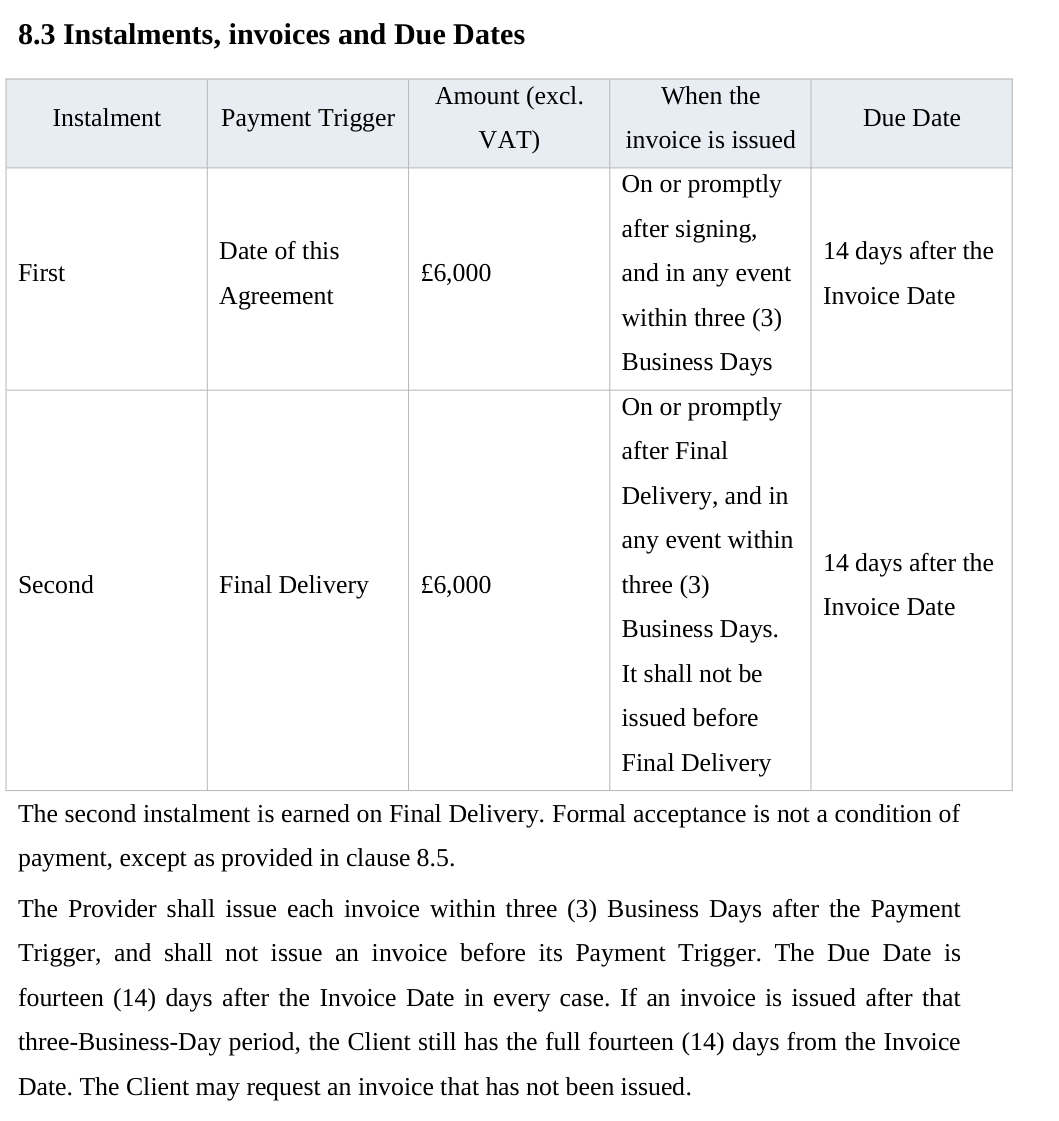
Figure 7. Payment milestones and invoicing terms in the main agreement.
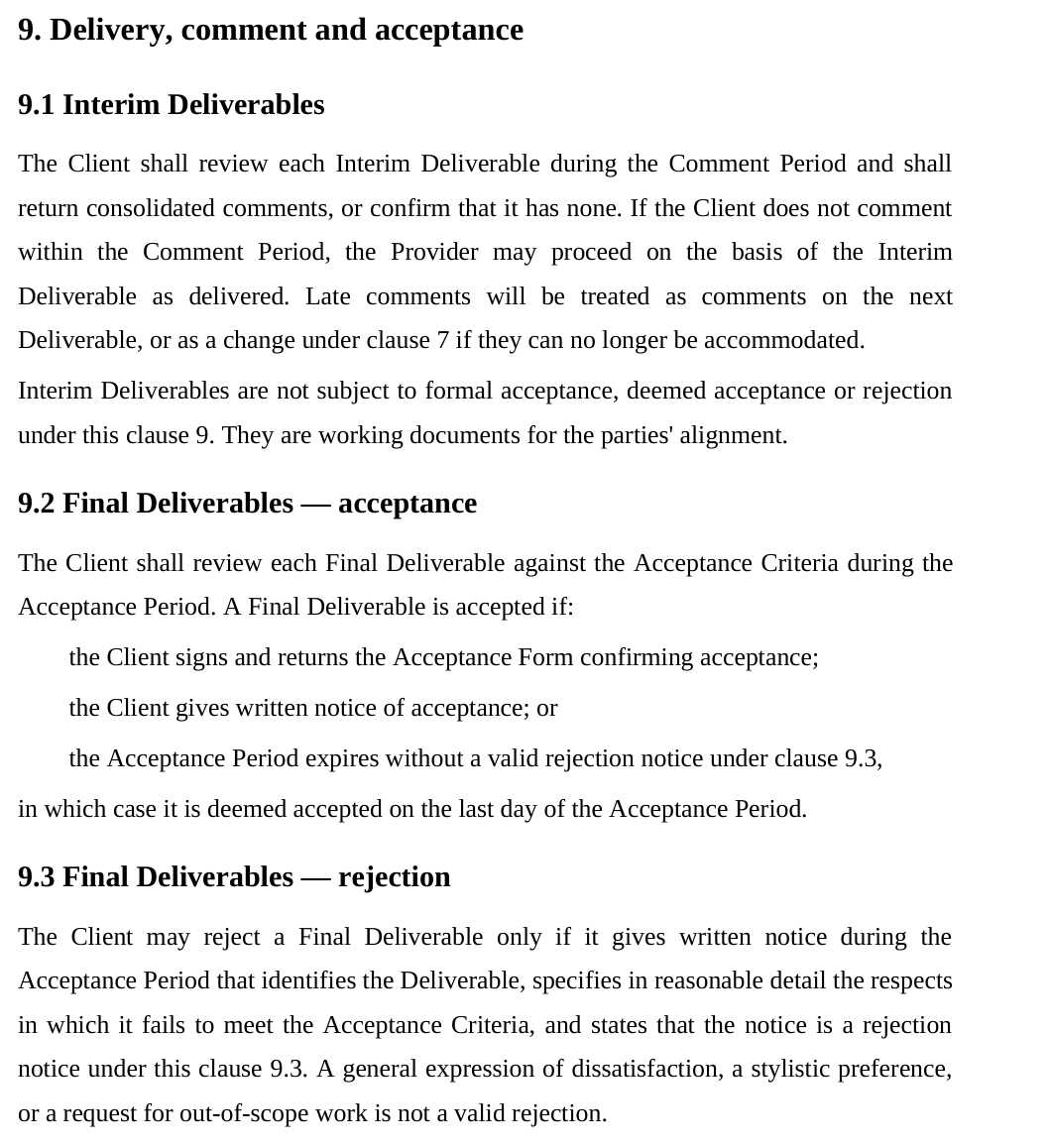
Figure 8. Separate procedures for interim feedback and final acceptance.
The revised wording separates the payment trigger from the invoice date and the due date, and distinguishes interim deliverables, which the client comments on, from final deliverables, which are subject to acceptance. These remain working drafts for commercial negotiation and legal review.
Try It Yourself: Your First Legal Workflow with AutoClaw
The two prompts below mirror the example in this walkthrough. Start a new conversation in AutoClaw's Legal workspace, send Prompt 1 with your own details, then send Prompt 2 as a separate message in the same conversation. Answer the clarification questions before moving on.
Prompt 1 — Share your business brief
I represent [service provider] (the Provider) in a B2B consulting engagement with [client] (the Client). Do not invent missing company particulars.

Jurisdiction: [jurisdiction and country]
Services: [describe the project and its business purpose]
Project duration: [duration]
Project fee: [amount and currency, and VAT treatment if known]
Payment arrangement: [instalments, payment triggers, invoice timing and due-date basis]

Expected deliverables:
D1 — [initial deliverable]
D2 — [interim deliverable]
D3 — [final report or main deliverable]
D4 — [summary or presentation deliverable]
[Add, remove or rename deliverables to match your project.]

I need a professional English-language B2B Consulting Services Agreement from the Provider's perspective, together with a Statement of Work, Payment Schedule, Deliverable Acceptance Form, internal Negotiation Guide and Lawyer Review Required checklist.

The drafting should protect the Provider's legitimate commercial interests while remaining commercially reasonable. Identify any unconfirmed facts or negotiable terms rather than inventing them.

I will send a separate clarification-check instruction next. Do not draft the agreement or supporting documents yet.
Prompt 2 — Ask for a pre-drafting clarification check
Before drafting the agreement, review the business information I have provided. Identify any material gaps, ambiguities or conflicting instructions, and ask me the questions needed to resolve them. Distinguish essential information from details that can remain as placeholders.

Do not draft the agreement yet. Wait for my responses before proceeding.
Once you have answered, AutoClaw may go straight into drafting. If it pauses instead, send this follow-up:
Optional follow-up — Proceed with drafting
Using the confirmed information in this conversation, draft the Consulting Services Agreement and supporting documents requested in my original brief. Use placeholders for unresolved facts, flag commercial choices that need approval, and keep the agreement and schedules consistent. Provide editable drafts for review.Compare the draft with the business terms you confirmed and ask for targeted revisions where needed. For other contract types, adapt the transaction details, clause requirements and supporting documents; a consulting agreement's terms will not suit every deal.
Final Thoughts
Good contract drafting starts with understanding the transaction. AutoClaw helps you surface the key decisions, turn confirmed requirements into editable drafts and organise the supporting documents for review. The same approach works for services, supply or confidentiality agreements, as long as the terms are tailored to the deal and the applicable law: describe the arrangement, settle the open questions, generate the drafts, then check them against the brief before anyone signs.
Try the two-prompt approach with your next contract brief.
Demonstration note: This article is based on a genuine user need, recreated to protect the user's privacy. The company names and transaction terms are fictional. Screenshots come from different stages of our reconstructed testing, including a separate clarification exercise and drafting run. The documents shown are drafts for commercial and qualified legal review, not approved agreements or legal advice.