Save, Deliver, and Keep Collaborating
Choose files based on what you'll do next
| What's next | Files to keep | What to check before delivery |
|---|---|---|
| Publish images or send previews | PNG, JPG | Size, sharpness, text, platform safe zones, and composition after cropping. |
| Keep updating prices, text, or graphics | Editable source files such as SVG | Whether text is still editable, fonts are available, and all graphics and images are included. |
| Try out pages or hand off to front-end developers | HTML plus the images, fonts, and notes it depends on | Opening locally, page navigation, forms, filters, multiple devices, and resource paths. |
| Present in a meeting or keep refining a proposal | PPTX; add a PDF when you need a fixed read-only version | Page count, story order, fonts, charts, speaker notes, and page edges. |
| Keep collaborating in a design tool | Source files; the "Copy to Figma" option in the HTML preview menu | Whether fonts, images, layers, and layout still meet your editing needs after pasting. |
You can state the delivery format in your initial request, for example "I need an editable PPTX" or "Please package the HTML, images, and fonts." To see which files a task produced, check the response and "Outputs."
Use the download and open menus in the preview area
Open an HTML result and click the download icon in the top-right corner to see "HTML source file," "Copy to Figma," "PNG image," and "PDF document." When you choose HTML, PNG, or PDF, follow the save prompts, then open the file to check the exported range and appearance. See below for what to do after "Copy to Figma." To go to the actual file location, use the "Open" menu next to it.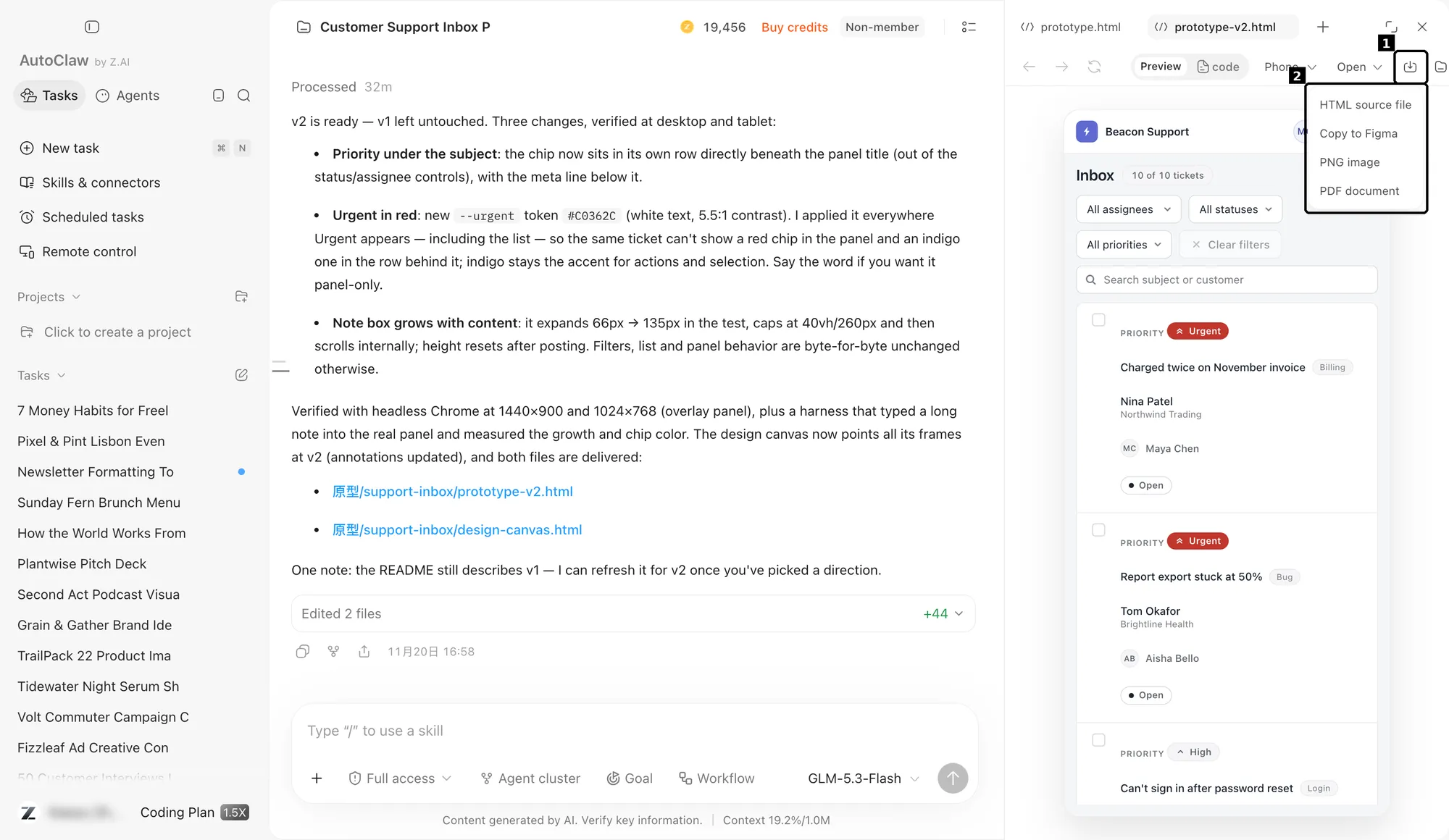
Figure 14 | Download: ① Download button in the top-right corner; ② Menu with HTML source file, Copy to Figma, PNG image, and PDF document.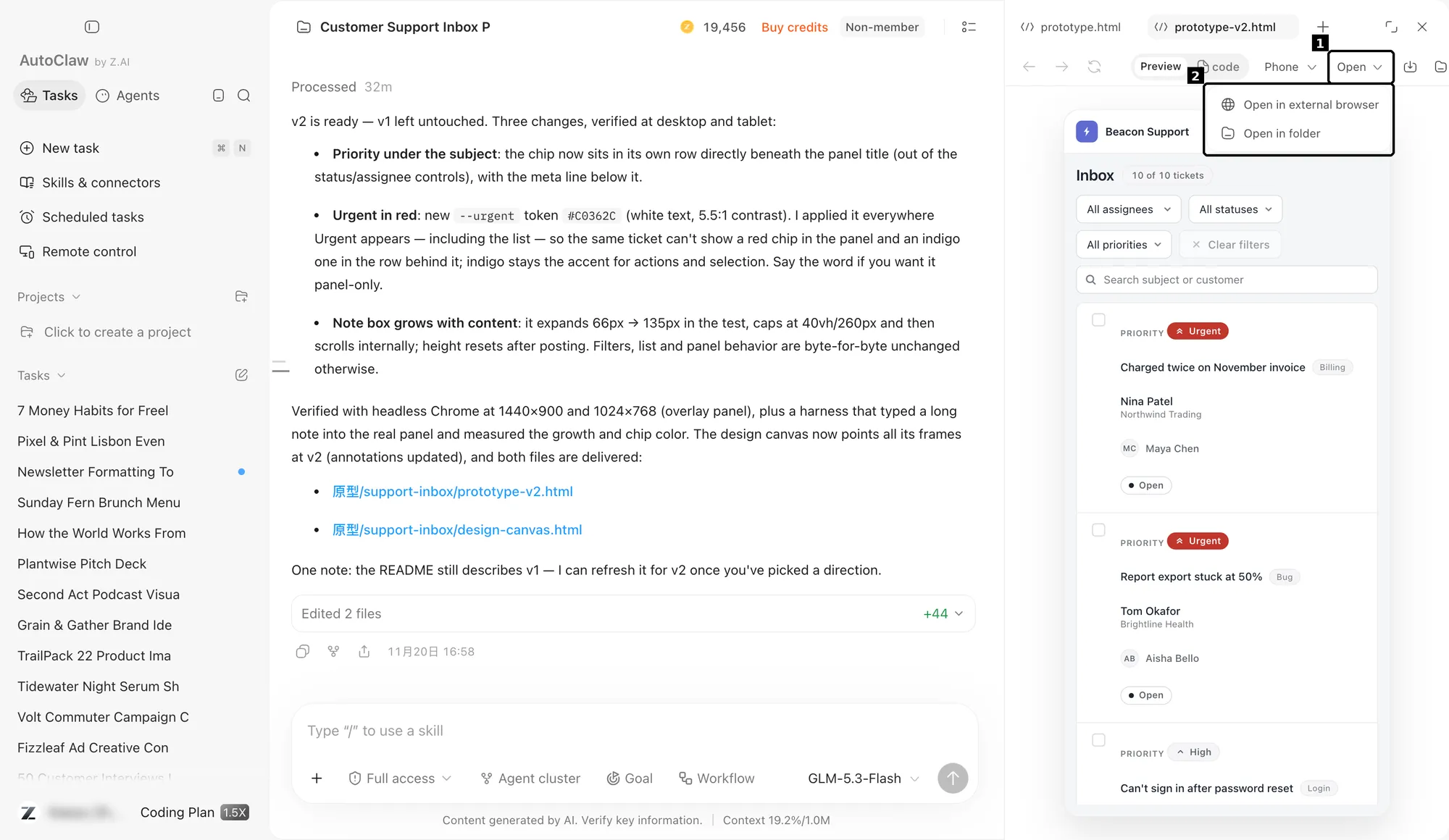
Figure 15 | Open: ① "Open" button; ② Choose Open in external browser or Open in folder.
"Copy to Figma" works well when you want to continue in Figma; after copying, paste into Figma and check the content. For PPTX, SVG, ZIP, and other files delivered directly, save the original files from the file links in the response.
Hand off resources together to the next collaborator
A web page may reference images, fonts, and other pages in the same folder. When handing off, keep the original folder structure, or ask Design Expert to package the main file and its dependencies into a single ZIP. After unzipping, open the main entry point (for example, index.html) and check images, fonts, navigation, and interactions before sending it to a teammate.
Please prepare the final delivery package for this task:
Include the main HTML, all local images and fonts, and any pages that need to open with it; check the relative paths.
Add a short readme listing the main entry point, what each file is for, the available interactions, and the source files to keep for future edits.
Package everything as a ZIP and list the files it contains.
Save versions so each round of edits has a clear starting point
Once a round of edits is approved, save versioned source files and previews, such as "menu-v1.svg" and "menu-v1.png." In the next round, you can ask to "keep v1 and save as v2," and describe what to change. To go back to an earlier draft, open the saved v1 source file, upload it or point Design Expert to it, and continue from that version.
When working across people, hand off four things together: final files, editable source files, usage notes, and open questions for the next round. For prototypes, add "which page to start from and which actions can be demoed"; for ads, add sizes and creative direction; for charts, add data sources and units. With these details clear, everyone has a shared basis for future edits.